
Nigeria e-visa: applying online for a short visit

The e-visa is for foreign passports. A Nigerian citizen enters on a Nigerian passport, and New York’s FAQ says a Nigerian by birth who travels on a US passport needs a visa, which the e-visa can be.
Nigeria’s e-visa is a short-visit visa that is applied for, paid for and issued online, with no appointment at the Embassy or a consulate.
New York’s visa page says most decisions arrive within 48 hours, by email.
It covers tourism, family visits, business trips and transit, among other classes.
Anyone who will work in Nigeria or stay longer needs a regular visa, which since July 2026 is lodged in person at the Embassy or a consulate, according to the Embassy’s notice and New York’s, as the visa guide explains.
Print the approval letter and carry it: the NIS says officers check it at the port of entry and endorse or stamp your passport there.Who can apply for Nigeria’s e-visa
New York’s page names two groups: foreign nationals visiting Nigeria, and Nigerians with dual citizenship who enter on their foreign passport.
The Nigeria Immigration Service FAQ adds that eligibility depends on nationality, the purpose of the visit and the documents.
It also warns that some nationalities may still have to apply in person, under bilateral agreements or visa reciprocity. For comparison, the Embassy’s visa page gives US$160 for a regular visa on a US passport.
New procedure guides, by email
We’ll email you when we publish a new procedure guide. No ads, and you can unsubscribe at any time.
The classes the e-visa covers
The NIS lists thirteen. The one most dual nationals look for is the last: a class for returning holders of foreign passports who are Nigerians by birth.
| Class | For |
|---|---|
| Tourism, Visiting (single entry) | holidays and family visits |
| Business (single entry, multiple entry, frequent executives) | meetings and trade trips |
| Transit | passing through Nigeria |
| Sports, Creative Arts, Study Tour | events, performances and study visits |
| Academic Exchange, International Cultural Exchange | students, scholars, lecturers, exchanges |
| Emergency/Relief Work | relief missions |
| Returning holders of foreign passports | Nigerians by birth on a foreign passport |
How to apply for the e-visa, step by step
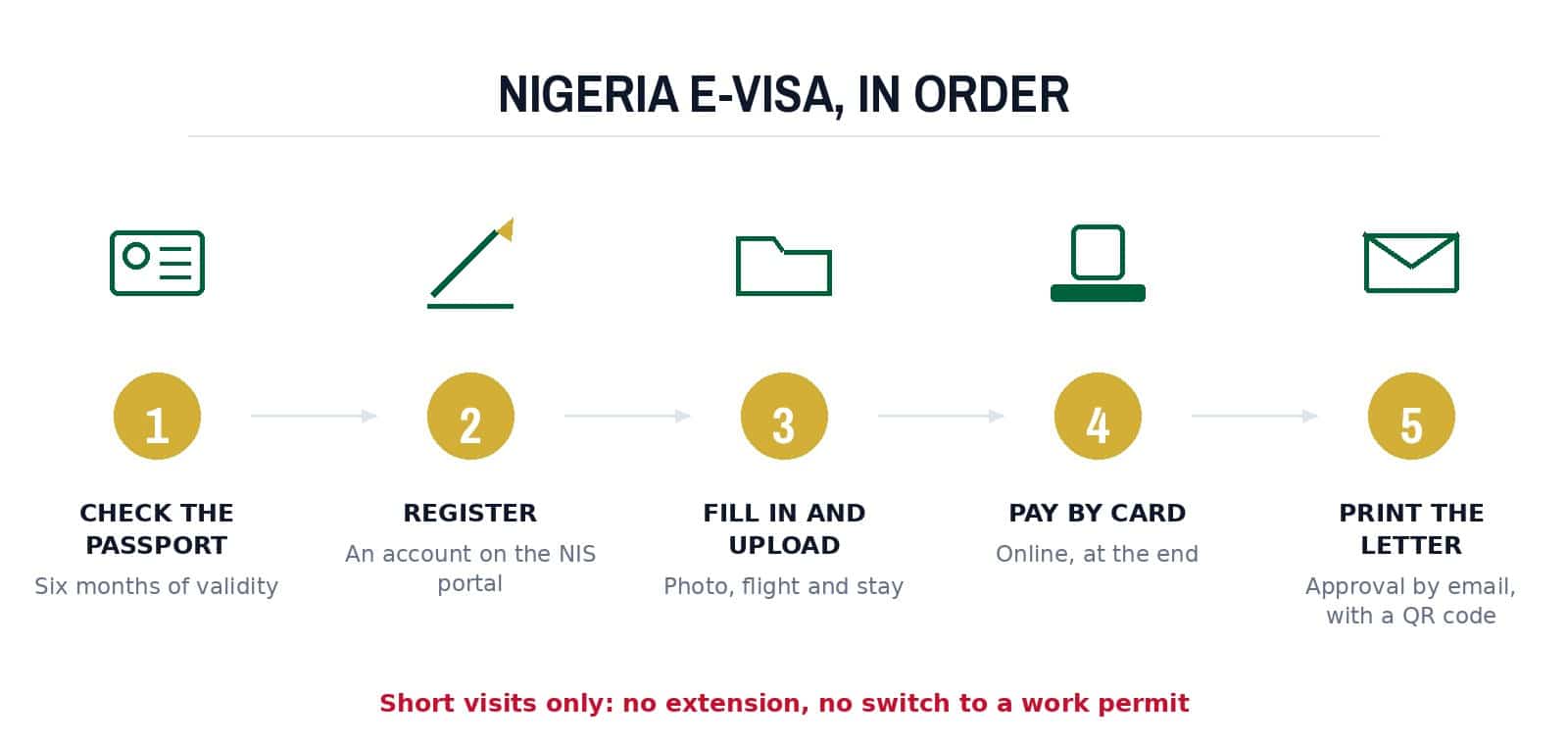
New York’s page and the NIS FAQ describe the same path on the NIS e-visa portal:
- Check the passport: at least six months of validity, with blank pages.
- Register an account on the portal and choose the visa class.
- Fill in personal details, the purpose and dates of travel, and the passport.
- Upload what the class asks for, such as invitation letters, bank statements, hotel reservations or the passport data page.
- Pay online by credit or debit card at the end.
- Wait for the email: an approved e-visa comes as an approval letter with a QR code and a reference number.
- A passport with at least six months of validity and blank pages
- Recent passport-size photos
- A flight booking or return ticket
- A hotel reservation or the host’s address
- For business: an invitation letter and the host company’s CAC certificate
- Proof of funds: 30 to 180 days of bank statements, depending on the class
- For a minor: the birth certificate and a parental consent letter
Limits to know before you book a flight
Visa on arrival, and the landing card
The Embassy’s home page still carries a Visa On Arrival link, and it leads to the NIS home page. The NIS self-service menu offers Apply for Regular Visa and Apply for e-Visa.
Every passenger also completes a Landing and Exit Card, which the NIS made mandatory for all passengers entering or leaving Nigeria from 1 May 2025, according to its website.
Paying, and avoiding copycat sites
The fee is paid online by card at the end of the application, the NIS says. New York tells applicants to be wary of unofficial websites offering e-visas, and the NIS to avoid third-party sites promising faster approval for an extra charge.
Questions about an application go to the NIS e-visa desk at [email protected].
Checked against the official pages linked above.